The Same Unit Sold Twice: When Two Products Share One Stock Pool
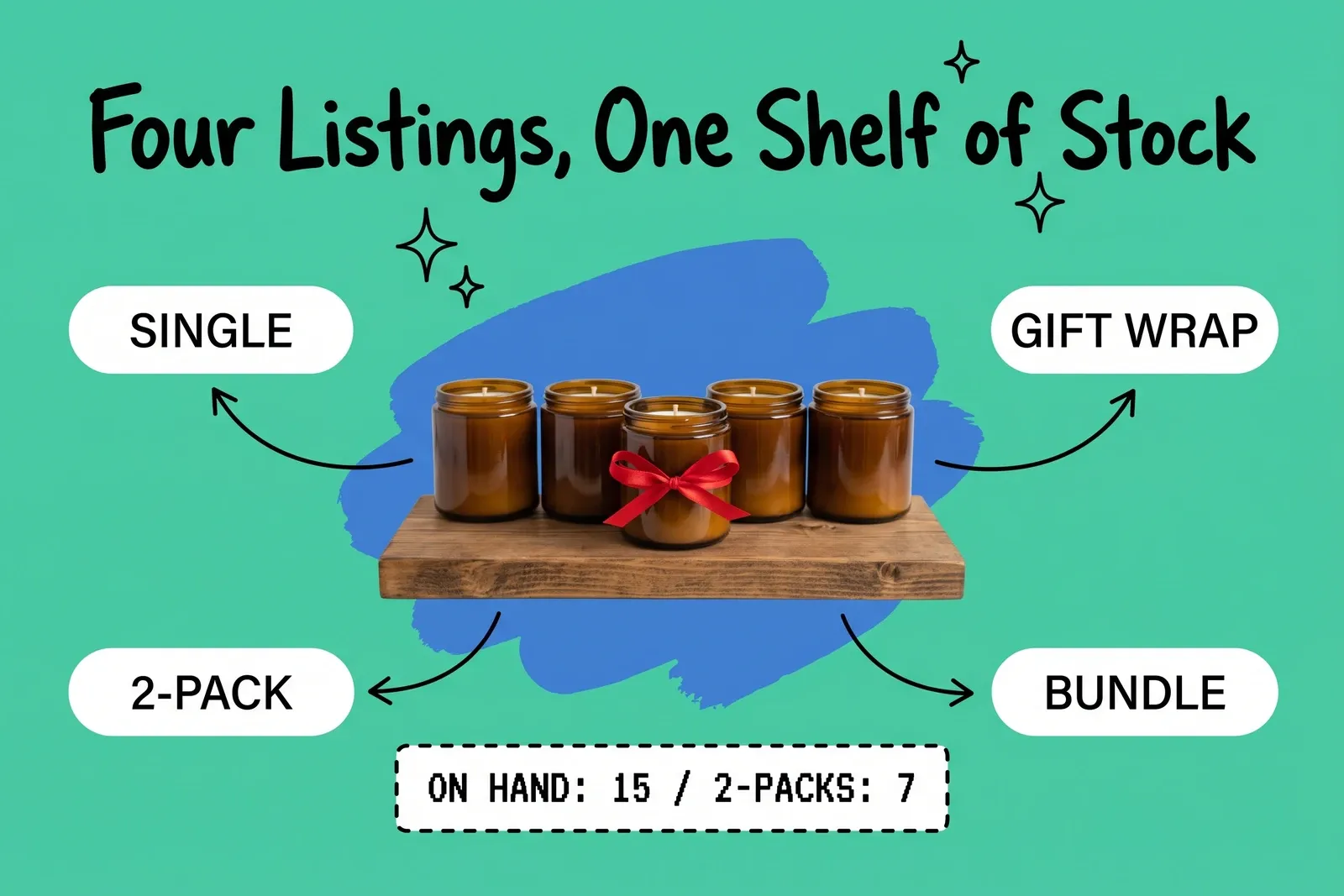
You sell a candle on its own. You also sell it as a 2-pack, as a gift-wrapped version, and inside a holiday bundle with a matchbox. That's four listings and one shelf of candles. When the shelf runs out, all four listings have to know at the same moment. If any of them doesn't, you've sold a candle that's already in someone else's box.
Only the physical item should hold a count. Every listing that uses it should either draw down that count or calculate its availability from it. Getting there means answering four questions: what gets decremented, when, at which location, and on which channel.
Why does the same unit get sold twice?
It gets sold twice because two listings each hold their own count of the same physical stock. Suppose the 2-pack was created as its own product with its own count of 10, and the single has a count of 20. Both numbers came from the same 20 candles, so sales on one never reach the other. Each listing's count looks right on its own, but together they overstate what's on the shelf.
In both Shopify and BigCommerce, stock lives on a per-variant record, so a second listing only shares stock if it's linked on purpose. BigCommerce's developer docs say "Variants are usually what you track inventory against," and every variant except the base variant needs its own SKU. Shopify's help center says you can "manage inventory for each variant," and Shopify's developer docs say each inventory level holds the available quantity for an item at one location. Any listing that isn't wired to those records counts the same stock a second time.
Which products share a stock pool?
In our framework, shared pools usually take one of four forms. In each one, the question is what should go down when it sells.
Pattern | Example | What should be decremented |
|---|---|---|
Same item, second variant | "Gift-wrapped" as a separate variant | The base item, once |
Multipack | 2-pack built from singles | The base item, twice |
Bundle or kit | Candle + matchbox | Each component, by its quantity |
Made-to-order option | Engraving, custom color | The blank item it's made from |
Multipacks are easy to get wrong. Shopify's Bundles app builds a multipack starting from "Duplicate product." Make sure the duplicate is set up as a bundle of the single, not left as a product with its own count.
Variants and options are where platforms differ. BigCommerce's docs say you "cannot track inventory against combinations of modifier values," and that modifiers "cannot be used as part of a variant." Our reading: on BigCommerce, if gift wrap or engraving is a modifier, the sale draws from the base variant's stock. Shopify has no such split. Its help center says "each combination of option values for a product can be a variant," and inventory is managed per variant. So on Shopify, a "gift-wrapped" option creates a second variant with its own count, and the same candle is listed twice unless you link the two.
What should be decremented, and when?
Reserve the component's units when the order is placed, not when it ships. Available should drop at order, so no channel that reads the same available count can sell them.
Shopify's help center describes this as moving units out of Available and into Committed. Its example: "The 20 sold inventory units are now in a Committed state because they're a part of the orders that have been placed." Committed units are part of orders not yet fulfilled, and on hand is the sum of committed, unavailable and available. Shopify's developer docs add that committed quantities are "managed by Shopify through actions such as creating and fulfilling orders," and that apps can't adjust them directly.
How the change is written matters as much as when. BigCommerce's developer docs describe absolute adjustments, which set a number, and relative adjustments, which add or subtract. The docs recommend absolute adjustments by default, but say "making order-related inventory changes through a third-party may require relative adjustments." They also warn that "the order of concurrent absolute adjustments is hard to predict" and advise: "Try to avoid sending concurrent absolute operations." In their example, stock is 10, and a relative -10 and an absolute 5 arrive at the same moment. The relative change returns an error and the stock ends at 5.
Our reading: mixing the two methods is the problem. For order-driven changes to a shared pool, send "minus two candles," not "candles = 18." Two systems that each push their own absolute counts will overwrite each other, which is the race BigCommerce warns about. BigCommerce also notes that its Inventory API "is not channel aware," so a write changes stock without regard to which storefront you meant to affect.
Why did the bundle still show in stock when a component was gone?
A bundle's availability isn't stock. It's a calculation, and the calculation can run late or leave things out.
Shopify states the basic rule plainly: "The product with the lowest inventory level determines how many bundles can be sold." Its help center works through an example. A bundle needs 2 chairs and 1 desk, and there are 15 chairs and 8 desks. Chairs give 15 ÷ 2 = 7.5, rounded down to 7, so 7 bundles are available. For fixed bundles, Shopify's developer docs say "The parent inventory quantity is the minimum of the component's inventory quantities."
The min-over-components math is the easy part. When it runs, and what it includes, is where bundles go wrong.
The calculation runs on a trigger
WooCommerce's Product Bundles documentation says bundle stock status is "automatically synced via a background process," by default triggered when a customer visits the bundle's product page. It also warns that you "cannot rely on the Stock Status and Stock Quantity properties alone" to find bundles with insufficient stock, and points to a stock report instead. Our reading: a feed or integration that reads only those two fields can show a bundle in stock after a component has sold out.
Some components are left out
Shopify's help center says components that aren't tracked, or that are set to continue selling when out of stock, are excluded from the bundle calculation. If the matchbox isn't tracked, the bundle's number follows the candles alone.
Customized bundles work differently
For customized bundles, Shopify's developer docs say the app, not Shopify, "maintains instock/out of stock for the parent." Components are "always checked in cart and checkout providing some built-in oversell protection."
For app-built bundles generally, Shopify's developer docs say that once an app has assigned components to a bundle, "only that app can manage the components of the bundle."
Does "in stock" mean in stock at one location?
It depends on the platform. Location is where the platforms we checked disagree most.
Shopify's help center says bundles built with the Shopify Bundles app "don't track inventory by location, but by overall stock." Shopify's developer docs list both fixed and customized bundles as having "No fulfillment constraint." Square's help center takes the opposite approach for Square for Retail bundles: they "can only be sold if all components are available from the same location."
Our reading: with the Shopify Bundles app, which counts overall stock rather than per location, a bundle can show as available when the candle is at one store and the matchbox is at another. Test whether checkout accepts that order before relying on either outcome. On Square, the same stock spread would stop the bundle from selling. If you sell on both, one "available" figure for the bundle means two different things.
Does the bundle setup cover every sales channel?
Not necessarily. Check each channel against the platform's documentation.
Shopify's documentation is inconsistent here. The Shopify Bundles app page says bundles "must use the Online Store or Headless storefronts. Other sales channels are unsupported." The same page also says to set a bundle to Active "to publish it to your Online store, Shop, and Shopify POS sales channels." Shopify's main bundles page lists the Online Store, Shop and Shopify POS, and says that on Google & YouTube, bundles are supported "with fixed product bundles only." Check your bundle app's channel list before assuming a bundle syncs anywhere but the online store.
A 2-pack listed on another channel as its own item, with its own quantity, is the same unit listed twice again. So "one source of truth" means more than syncing quickly. It means one count per physical item, with every listing on every channel calculated from it. The one source of truth guide covers the wider version of that problem.
How do you set up a shared pool that holds up?
Work through these in order. Each one closes a gap above.
- List every physical item and every listing that uses it. Include variants, multipacks, bundles, made-to-order options and listings on other channels. If you can't make this list, you can't protect the pool.
- Give the physical item the only count. Remove separate counts from 2-packs and gift-wrapped versions unless they are physically pre-packed and stored apart.
- Match options to your platform's stock model. On BigCommerce, a modifier for gift wrap or engraving draws from the base variant's stock. On Shopify, every option combination can be a variant with its own count, so link a gift-wrapped variant to the plain one rather than counting it separately.
- Track every component. On Shopify, an untracked or continue-selling component falls out of the bundle calculation.
- Reserve at order, in relative terms. Hold units when the order is placed, and send "minus two" rather than overwriting the count.
- Decide what "available" means by location. Choose whether a bundle may sell when its components sit in different places, and check what each platform does by default.
- Calculate every off-storefront listing from the same components. A listing on a channel the bundle setup doesn't cover won't get its numbers from that setup.
- Keep pre-orders out of Shopify bundles. Shopify's help center says bundles "aren't compatible with purchase options," which covers subscriptions, pre-orders and try-before-you-buy. Handle pre-orders with their own rule; see backorder management.
A central inventory management record helps only if steps 1 and 2 are done first. Otherwise you're syncing two counts of the same candle faster.
Frequently asked questions
Why does my bundle still show in stock when one component is sold out?
A bundle's availability is a calculated number, not a count of boxes on a shelf. On some platforms that calculation runs on a trigger. In WooCommerce Product Bundles, by default, it's a background sync started when a customer visits the bundle's page. In Shopify, components that aren't tracked, or that are set to keep selling when out of stock, are left out of the bundle's calculation.
Should a 2-pack have its own inventory count?
Usually not, if you pack it to order from singles. A 2-pack that keeps its own count turns one shelf into two numbers that drift apart, and that's how the same unit gets sold twice. Set the 2-pack up so it uses two units of the single item, and calculate its availability from the single's stock: 15 singles support 7 two-packs. Give it a count of its own only if you pre-pack it and store it separately.
Does a bundle built in my online store cover every sales channel?
Check before you assume it does. Shopify's documentation is inconsistent on this. The Shopify Bundles app page says bundles must use the Online Store or headless storefronts and that other sales channels are unsupported. The same page and Shopify's main bundles page also mention Shop and Shopify POS. Any channel that isn't covered needs its availability calculated from the same component counts.
Start your 14-day free trial
See how OmniOrders connects your sales channels, 3PLs, and carriers into one operational layer — free for 14 days, no credit card.