EDI 850 Purchase Order: What It Is and How It Works
An EDI 850 purchase order is the electronic version of a paper PO, and it is usually the first document that starts a retail order. A buyer, often a big-box retailer or a distributor, sends it to you to formally place an order, and it carries everything your system needs to fulfill that order: the buyer and ship-to details, line items, quantities, prices, and requested delivery dates.
An EDI 850 is the electronic data interchange transaction set for a purchase order, a standardized digital document that replaces an emailed or faxed PO with structured data your software can read and turn into an order automatically.
If you sell to retailers like Walmart, Target, or Home Depot, the 850 is how their orders reach you. Get it right and orders flow into fulfillment untouched. Get it wrong and you rekey POs by hand, miss ship dates, and rack up chargebacks. This guide covers what an 850 is, what is inside it, what one looks like, and how it moves through your order management system.
What is an EDI 850 purchase order?
EDI stands for electronic data interchange, the exchange of business documents between companies in a standard electronic format. Each type of document has a number. The 850 is the number assigned to the purchase order in the ANSI X12 standard used across North America. When someone says "send me an 850," they mean send the order as structured EDI data, not as an email.
The 850 does the same job as any purchase order. It tells the seller what the buyer wants to buy, how much, at what price, and where to ship it. The only difference is the packaging. Instead of a document a person reads and types into a system, the 850 is a file laid out so that software can parse every field and act on it.
That packaging matters more than it sounds. Manual order handling is expensive. According to APQC (the American Productivity and Quality Center), the full cost to process a single purchase order runs from about $14 for top performers to more than $54 for the slowest teams, once you count labor, error correction, and follow-up. Aberdeen Strategy and Research puts manual order data entry at $15 to $25 per order. An 850 that lands in your system as clean data skips almost all of that cost.
EDI is not a legacy footnote either. IMARC Group valued the global EDI market at $42.7 billion in 2025, with North America holding close to 40 percent of it. Retail runs on these documents, and the 850 sits at the front of the chain.
What is inside an EDI 850?
An 850 is organized into three areas: a header, a detail section, and a summary. Each area is built from segments, which are short lines of coded data, and each segment holds elements separated by a delimiter.
The header area
The header carries information that applies to the whole order:
- The PO number and PO date
- The purchase order type (new order, change, blanket)
- The buyer, the ship-to location, and the bill-to party
- Payment terms and requested delivery or cancel dates
- References like department numbers or contract IDs
This is the part your system uses to know who ordered, where it goes, and by when.
The detail area
The detail area lists what was actually ordered, one line item at a time. For each line you get:
- A product identifier, often a UPC, GTIN, or the retailer's own item number
- The quantity ordered and the unit of measure
- The unit price
- Optional line-level notes or ship-to overrides
A typical retail PO holds around 15 line items, and every one of those lines is a chance for a manual keying mistake if you handle it by hand.
The summary area
The summary closes the document with control totals: the total number of line items and the total quantity. Your system checks these against what it parsed so nothing was dropped or duplicated in transit.
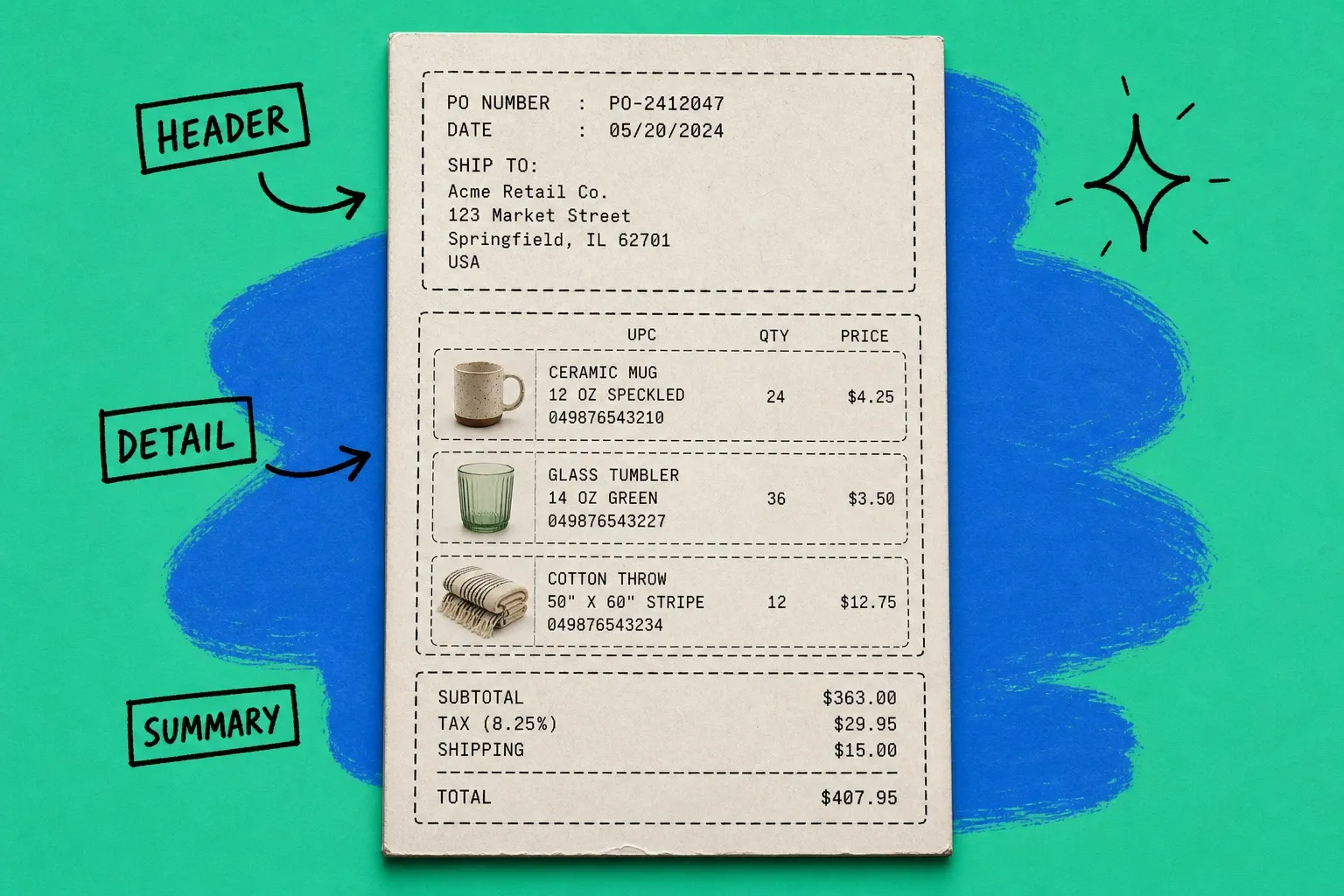
EDI 850 example: what a purchase order looks like
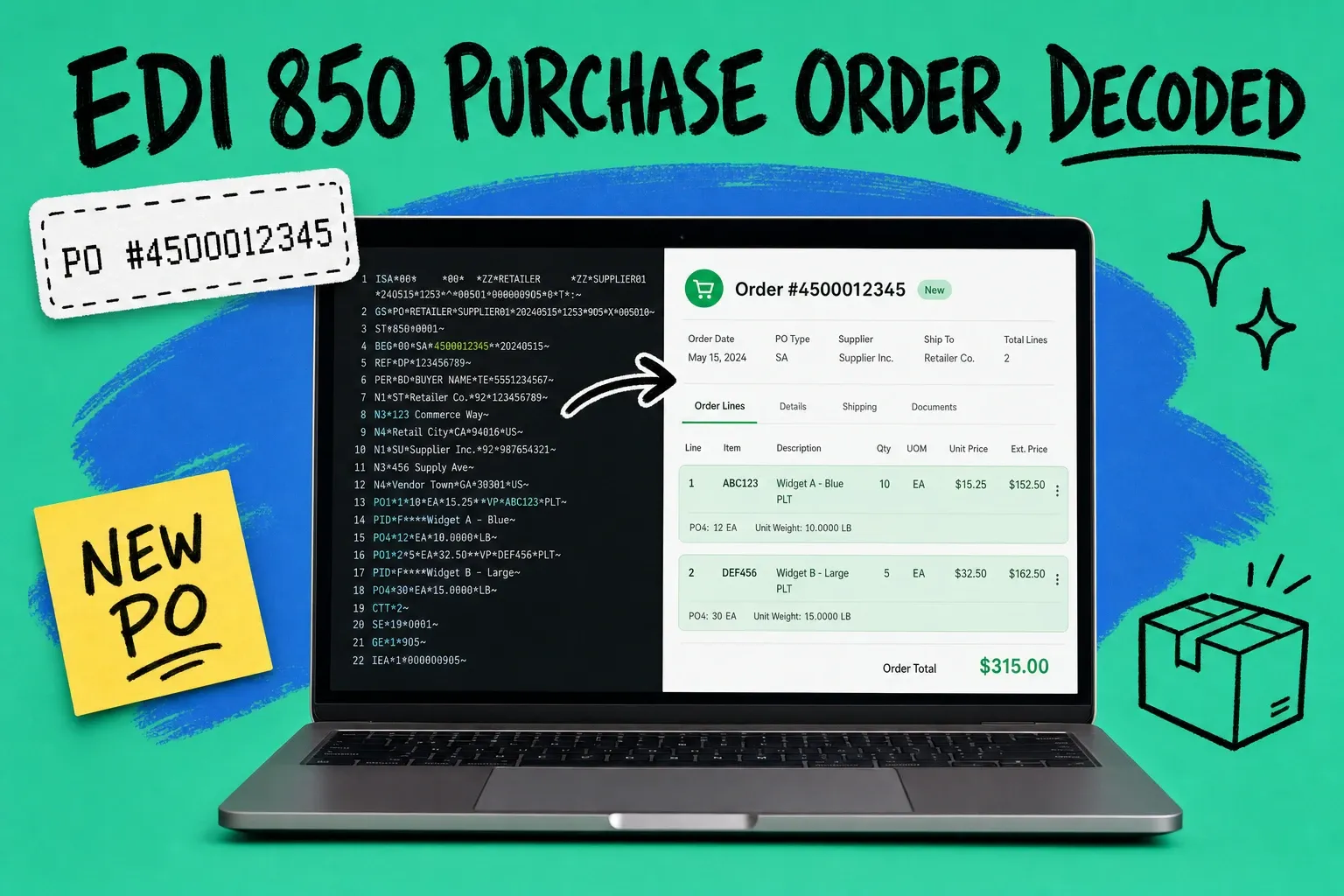
Raw EDI is dense, and this is where most people get lost. Here is a trimmed EDI 850 example in X12 format, with an asterisk as the element delimiter and a tilde ending each segment:
``` ST*850*0001~ BEG*00*SA*450001234520260722~ REF*DP*038~ N1*ST*ACME RETAIL DC 07*92*0007~ PO1*1*24*EA*12.50UP012345678905~ PO1212EA8.75UP012345678912~ CTT2~ SE8*0001~ ```
Read line by line, it is not so scary. `ST850` opens a purchase order transaction. `BEG` gives the PO number (4500012345) and date. `N1ST` names the ship-to location. Each `PO1` is one ordered line: line 1 is 24 units of UPC 012345678905 at $12.50 each. `CTT*2` says there are two line items, and `SE` closes the transaction.
That block of code is what a person would otherwise retype into your system. When your order management platform reads it directly, the retyping disappears, and so does the typo that ships the wrong quantity.
How an EDI 850 flows into your order management system
An 850 does not go straight from the retailer into your warehouse. It travels through a few steps, and each one is a place you can automate.
- The trading partner sends the 850. The retailer transmits the file through a value-added network (VAN), AS2 connection, or an API bridge.
- Your EDI layer translates it. The raw X12 file gets mapped from the retailer's exact spec into your internal order format. Every partner formats their 850 slightly differently, so the mapping is what keeps them consistent.
- Validation runs. The order is checked against your catalog, pricing, and stock. Does the UPC exist? Does the price match your agreement? Is the item in stock?
- The order is created. A valid 850 becomes a live sales order in your system, ready to allocate and ship.
- You send an 855 back. Most retailers expect a purchase order acknowledgment (the 855) that confirms what you will ship and when.
This is exactly the kind of flow that a modern order management system is built to run. Instead of a person opening each PO and keying it in, OmniOrders ingests the 850, validates it against your catalog and inventory, and creates the order automatically, so your team only touches the ones that need a human decision. Orders that clear validation move to fulfillment without anyone rekeying a single line.
If you are still setting up trading-partner connections, our guide on EDI integration for ecommerce sellers walks through onboarding with the big-box retailers that mandate it.
How does the 850 fit with the other EDI documents?
The 850 is the opening move in a longer conversation. The most common documents that follow it are:
- EDI 855, purchase order acknowledgment. You send this to confirm the order, flag price differences, or note items you cannot fill.
- EDI 856, advance ship notice (ASN). You send this before the shipment arrives to tell the retailer what is coming and how it is packed.
- EDI 810, invoice. You send this to bill for what shipped.
- EDI 860, purchase order change. The buyer sends this to change an 850 they already sent.
Think of the 850 as the trigger. Everything downstream, from picking to invoicing, keys off the data it carries. If the 850 is captured cleanly, the rest of the cycle stays clean too.
How to avoid EDI 850 errors and chargebacks
Retailers fine suppliers for EDI mistakes, and the fines add up fast. A few habits keep you out of the penalty column:
- Follow the partner's exact spec. Walmart's 850 is not Target's 850. Map each one to the retailer's published guidelines, not a generic template.
- Validate before you accept. Catch a bad UPC or a price mismatch when the 850 arrives, not after you ship. Automated validation turns a chargeback into a quick exception review.
- Acknowledge on time. Many retailers expect the 855 within a set window. Missing it is its own chargeback.
- Watch for 860 changes. A purchase order change can land after you already started picking. Your system needs to catch it and adjust.
Catching problems early is the whole game. If you want a deeper look at spotting and clearing order issues before they cost you, see our post on order exception management.
Turn every 850 into an order without the manual work
The EDI 850 is the electronic purchase order that starts the retail order cycle. It packages the buyer, ship-to, line items, prices, and dates as structured data, and once your system reads it directly, the manual keying and the errors that come with it disappear.
You do not need a full-time EDI team to get there. You need a connection to your trading partners, clean field mapping, and validation rules that let good orders through and hold the rest for review. Do that once, and every 850 that arrives turns into an order on its own, so your people spend their time on exceptions and growth instead of retyping purchase orders.
Frequently asked questions
What is an EDI 850?
An EDI 850 is the electronic data interchange transaction set for a purchase order. It is the standardized digital document a buyer sends to a supplier to place an order, and it replaces a paper or emailed PO with structured data your systems can process automatically.
Is an EDI 850 the same as a purchase order?
Yes, in content it is a purchase order. The difference is format. A regular PO might be a PDF or email a person reads, while an EDI 850 is the same information in a machine-readable layout that follows the X12 standard, so software can turn it into an order without anyone typing it in.
What is the difference between an EDI 850 and an EDI 855?
The 850 is the purchase order the buyer sends. The 855 is the purchase order acknowledgment the supplier sends back to confirm what will ship, at what price, and when. The 850 starts the conversation and the 855 answers it before goods move.
What information does an EDI 850 contain?
An EDI 850 carries the PO number and date, the buyer and ship-to and bill-to addresses, each line item with its product identifier, quantity, unit of measure and price, plus requested delivery dates and any special terms. It is organized into a header area, a detail area for line items, and a summary area with totals.
How do you process an EDI 850 automatically?
Connect your trading partner through an EDI provider or your order management system, map the 850 fields to your order format, and set rules that validate each PO against your catalog and pricing. Valid orders drop straight into fulfillment, and only exceptions go to a person for review.
Start your 14-day free trial
See how OmniOrders connects your sales channels, 3PLs, and carriers into one operational layer — free for 14 days, no credit card.