Customer Self-Service Portal: Cut Support Tickets and Win Repeat Orders
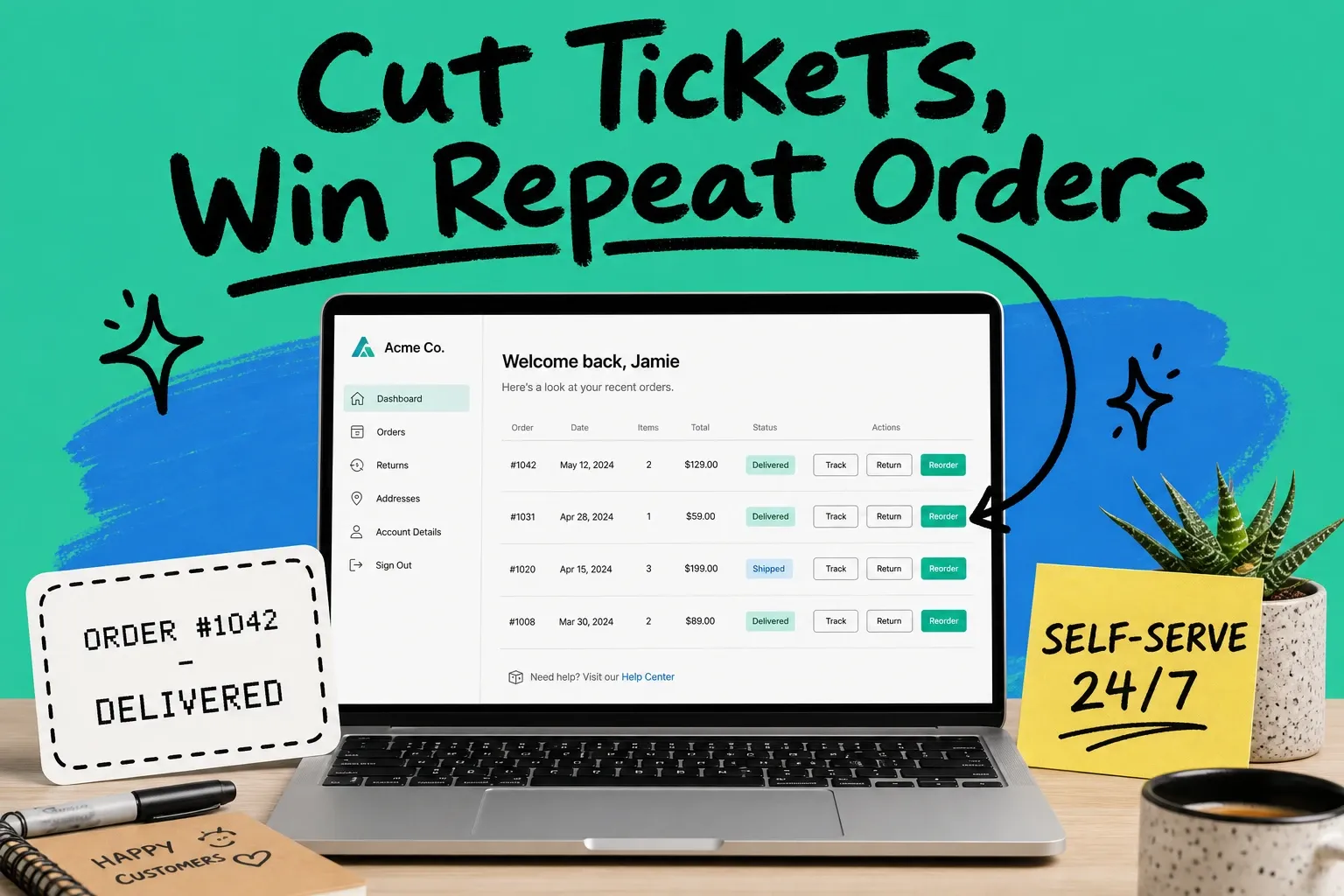
A customer self-service portal is a secure, branded page where your customers log in to track orders, check status, download invoices, start returns, and reorder past purchases without contacting your team. Done right, it removes your most repetitive support tickets and turns the post-purchase wait into a reason to come back and buy again.
A customer self-service portal is an authenticated, on-brand space that lets customers complete common order tasks themselves, 24/7, instead of emailing or calling support.
Most shoppers already want this. Salesforce research found that 61% of customers would rather use self-service channels for simple, everyday issues. They do not want to wait in a queue to ask where their package is. They want to log in, see the answer, and move on.
Why a customer self-service portal matters now
The shift toward self-service is not a trend you can sit out. Gartner expects self-service and live chat to surpass traditional channels like phone and email as the most important customer service technologies by 2027. Your customers are voting with their clicks, and the brands that make self-service easy are the ones earning trust.
There is a hard operational reason too: order-status questions. "Where is my order," often shortened to WISMO, is the single biggest category of ecommerce support. DigitalGenius, analyzing support data across its customer base, found WISMO questions averaged about 21% of all tickets in a normal month and climbed sharply during peak season. That means roughly one in five conversations your team has is a customer asking for an update you could have shown them automatically.
Every one of those tickets costs you. Agent time, response delays, and the frustration of a customer who just wanted a status they could not find. A self-service portal answers the question before it becomes a ticket.
The retention angle most teams miss
A portal is not only a cost-cutting tool. The window between "order placed" and "order delivered" is the most attention you will ever get from a customer. They check tracking, they refresh the page, they want to know what is happening.
If that experience lives on your branded portal instead of a carrier site, you control it. You can surface reorder prompts, recommend related products, and make the next purchase one click away. The same login that cuts a ticket can open a repeat sale. For a deeper look at turning that post-purchase window into revenue, see our guide on order tracking software.
What a customer self-service portal should include
You do not need every feature on day one. Start with the actions that kill the most tickets, then expand. Here is the practical priority order for most ecommerce brands.
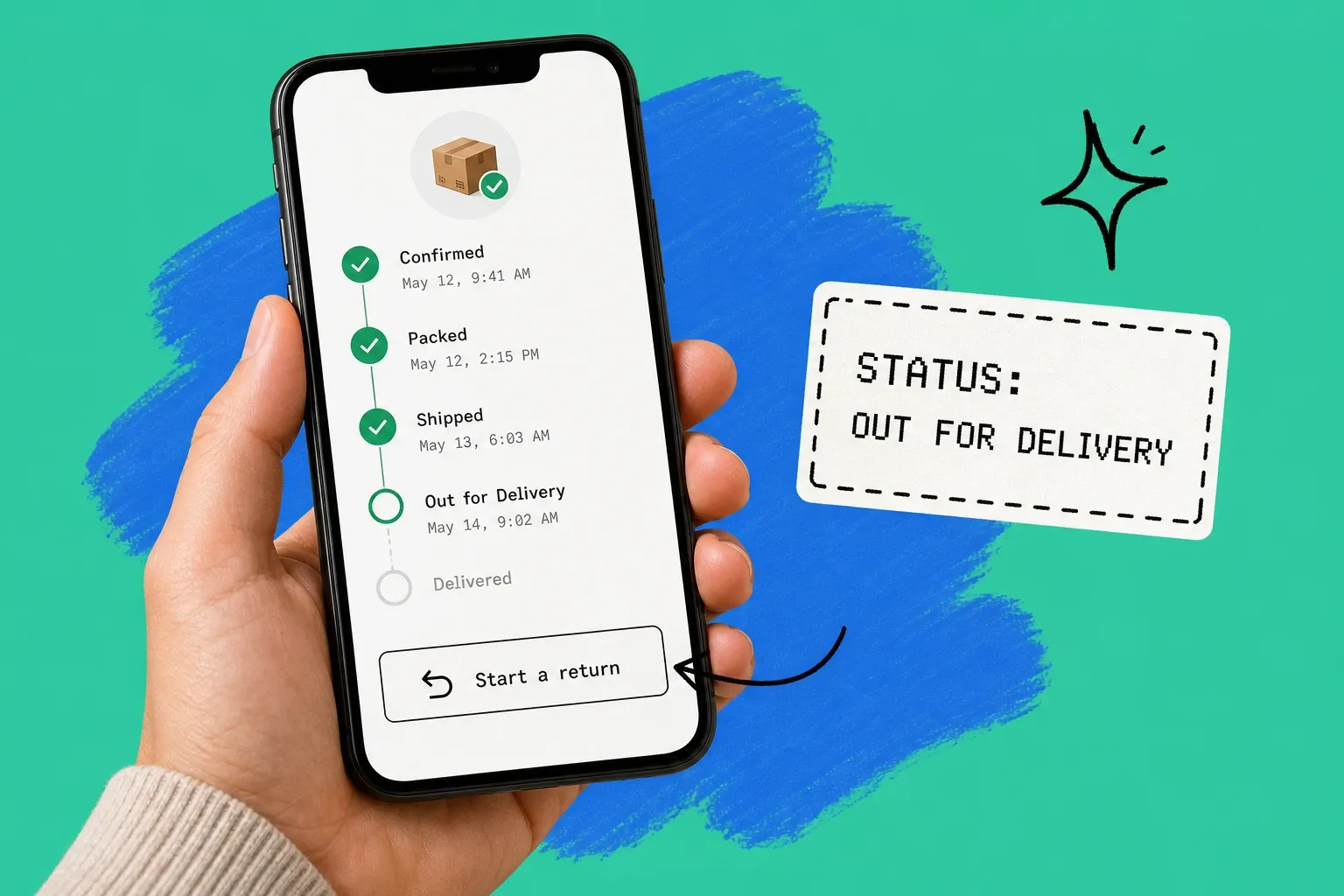
- Order lookup and live status. The non-negotiable starting point. Customers log in, see every order, and read a clear status: confirmed, packed, shipped, out for delivery, delivered.
- Tracking links. Pull the carrier tracking number into the portal so customers never have to dig through an email.
- Self-service returns. Let customers start a return or exchange and print a label without opening a ticket. Returns are the second most common post-purchase question after status.
- Downloadable invoices and receipts. Especially important for B2B buyers and anyone expensing a purchase.
- One-click reordering. Show past orders with a reorder button. This is where a support tool quietly becomes a sales channel.
- A searchable help section. For the policy questions that do not need a human: shipping windows, return rules, sizing.
Notice the pattern. Each feature maps to a question your team answers over and over. You are not building a portal for its own sake. You are moving repetitive work off your inbox and into a place customers can reach at 2 a.m.
B2B customer portals need more
If you sell wholesale or to other businesses, a basic B2C portal will not cut it. A B2B customer portal layers account context on top of order management: negotiated pricing, purchase order numbers, approval workflows, payment terms, and the ability to reorder straight from past invoices.
The buyer logged into a B2B portal is often reordering the same items on a schedule. Make that effortless and you protect the account. Make it clunky and you invite them to shop around.
How a self-service portal cuts support tickets
The mechanism is simple: deflection. Every question a customer answers themselves is a ticket your team never sees. When your portal covers status, tracking, and returns, you remove the bulk of routine inbound volume and free your agents to handle the genuinely hard cases.
But there is a catch worth being honest about. Self-service works best for routine, well-defined tasks. The same Gartner research that shows surging demand also found that self-service fully resolves only 14% of issues when it is poorly designed, with most journeys still spilling into other channels. The lesson is not "skip self-service." It is "design it around the questions customers actually have, and keep an obvious path to a person for everything else."
So scope your portal to the high-volume, low-complexity jobs first. Order status. Tracking. Returns. Reorders. Get those right and you will see real ticket deflection. Then point everything else to a clear contact option so no one feels trapped.
Connect it to live order data
Here is where most portals quietly fail. A self-service portal is only as good as the data behind it. If your portal shows "processing" while the warehouse already shipped the order, you have not deflected a ticket. You have created one, plus a trust problem.
That is why the portal should read from the system that actually holds live order and inventory data, not a stale nightly export. When status, stock, and tracking reflect reality in real time, customers trust what they see and stop reaching out to double-check. This is exactly the job an order management system is built for: it sits between your sales channels, warehouses, and carriers and keeps one accurate version of every order.
Building your customer self-service portal: three paths
You have a few options, and the right one depends on where your order data already lives.
- Platform-native. Many ecommerce platforms offer a basic customer account area with order history. Quick to turn on, but often shallow on returns, reordering, and real-time tracking.
- Help-desk add-on. Support tools can bolt a portal onto your help center. Good for FAQs and tickets, but the order data is only as fresh as the integration feeding it.
- Order-management-driven. Surface the portal from the system that already unifies your orders across channels. Because it owns live order and inventory state, status, returns, and reorders all reflect what is really happening.
For multichannel brands selling on Shopify, Amazon, Walmart, and more, the third path tends to win. When a customer can log in once and see every order regardless of where they bought, the experience finally feels like one brand instead of five disconnected systems. That is the core of what OmniOrders does: it centralizes orders, inventory, and fulfillment so the self-service experience your customers see is backed by accurate, real-time data.
Do not forget returns
Returns deserve special attention because they are both a top support driver and a major loyalty moment. A smooth self-service return earns trust. A confusing one loses a customer for good. If you sell across several channels, your portal needs to handle returns consistently no matter where the original order came from. Our guide to the RMA process for multi-channel sellers walks through how to keep that clean across Shopify, Amazon, and Walmart.
Measuring whether your portal is working
Put a few numbers in place so you know the portal is earning its keep:
- Ticket deflection rate. The share of customers who intended to contact support but resolved it in the portal instead. This is the headline ROI metric.
- WISMO ticket share. Track order-status tickets before and after launch. A working portal should pull this number down noticeably.
- Portal adoption. What percentage of customers log in and complete an action. Low adoption usually means the portal is hard to find or missing the features people want.
- Repeat purchase rate from the portal. If reordering lives in the portal, measure how much revenue flows through it.
Watch these for a few months and let them guide what you build next. If returns still generate tickets, your return flow needs work. If status questions persist, your data is probably stale.
A portal is a relationship, not a deflection trick
It is tempting to treat self-service purely as a way to shrink your support queue. That is the wrong frame. The brands that win treat the portal as an ongoing relationship: a place customers actually want to log into because it is faster and more useful than emailing you.
Get the data right, cover the questions people really ask, and keep a human one click away. Do that and your customer self-service portal will quietly cut your most repetitive tickets while giving customers an easy, branded path back to their next order. That is the rare operational upgrade that helps your team and your top line at the same time.
Frequently asked questions
What is a customer self-service portal?
A customer self-service portal is a secure, branded page where customers log in to manage their own orders. From one place they can track shipments, check order status, download invoices, start a return, and reorder past purchases. The goal is to answer common questions without anyone on your team touching a ticket.
What should a customer self-service portal include?
Start with order lookup and live status, then add tracking links, self-service returns or RMA requests, downloadable invoices, and one-click reordering. A searchable help section and saved addresses or payment details round it out. Prioritize the actions that drive the most repetitive tickets, which for most stores means "where is my order".
Does a customer self-service portal reduce support tickets?
Yes, when it covers the questions customers actually ask. Order-status questions alone make up a large share of ecommerce support volume, so letting people check status themselves removes a big chunk of inbound tickets. Just remember that self-service handles routine issues best, so keep a clear path to a human for anything complex.
What is the difference between a B2B and a B2C self-service portal?
A B2C portal focuses on individual orders: tracking, returns, and reordering. A B2B customer portal adds account-level features like negotiated pricing, purchase orders, approval workflows, credit terms, and reordering from past invoices. The core idea is the same, but B2B buyers expect their account context to carry through.
How do I build a customer self-service portal?
You can build one on your ecommerce platform, bolt on a help-desk tool, or surface it from your order management system. The fastest path for most brands is to connect the portal to the system that already holds live order and inventory data, so status, returns, and reorders reflect reality instead of a stale copy.
Start your 14-day free trial
See how OmniOrders connects your sales channels, 3PLs, and carriers into one operational layer — free for 14 days, no credit card.