B2B Customer Portal: Self-Service Reordering, Status, and Account Management
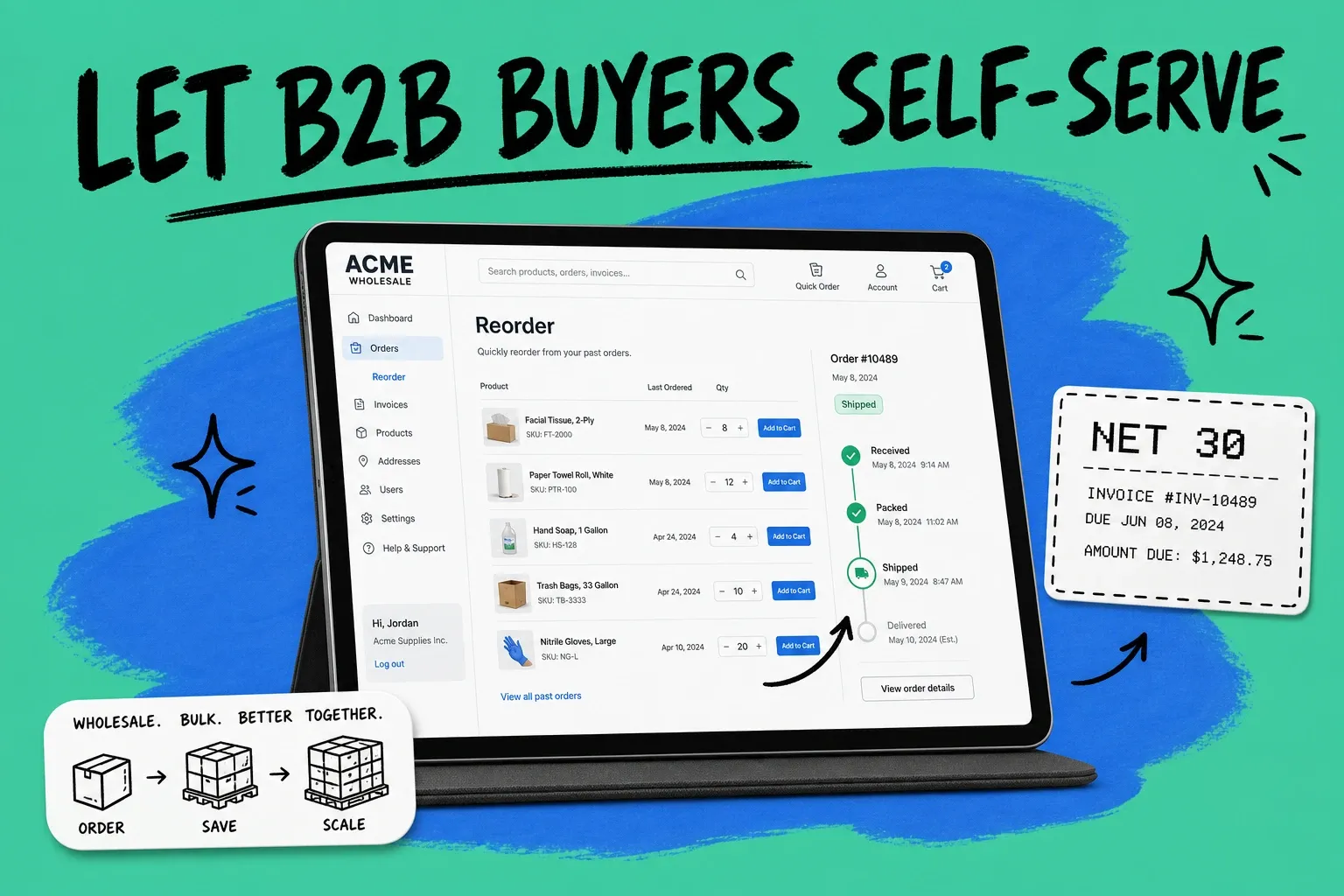
A B2B customer portal is a secure, branded area where your wholesale and trade buyers log in to reorder, check order status, and manage their account on their own, without emailing or calling your team. A B2B customer portal is the self-service account hub for your existing business buyers: reorder from history, track shipments, view invoices and terms, and manage users, all in one login. It is not a public storefront. It is the place your accounts go after they already buy from you.
If your buyers still email a rep to ask "where is my order" or "can you re-send last month's order," you are paying for work a portal does automatically. And your buyers feel the friction. Gartner's Future of Sales research predicted that by 2025, 80% of B2B sales interactions between suppliers and buyers would happen in digital channels, with 33% of buyers actively wanting a seller-free experience (Gartner, 2020). The buyers are already there. The question is whether you give them a self-service home or make them wait on a human.
What is a B2B customer portal?
A B2B customer portal is a password-protected website tied to a specific buyer account. Once a buyer logs in, they see their own data: their order history, their negotiated prices, their open invoices, their shipments in transit. Everything is scoped to that account, so what a buyer sees reflects the real relationship they have with you.
That account scoping is the difference between a portal and a generic ecommerce site. A direct-to-consumer store shows the same catalog and the same prices to everyone. A B2B customer portal shows Account A their wholesale tier pricing and Account B their distributor pricing, and it remembers what each one bought last quarter.
The portal usually covers four jobs:
- Reordering from past orders or a saved list
- Order status and tracking for everything in flight
- Account management, including invoices, payment terms, and balances
- User access, so a buyer's purchasing team can each have a login
Get those four right and you have removed most of the reasons a buyer would ever need to email you.
A B2B customer portal vs. a standard self-service portal
The terms overlap, so it helps to be precise. A general customer self-service portal is built around support: knowledge bases, ticket status, and account settings. A B2B customer portal keeps all of that but puts ordering at the center, because in B2B the buyer's main job is purchasing, not troubleshooting.
If you sell to both consumers and businesses, you may want both experiences. We cover the broader pattern in our guide to building a customer self-service portal. The B2B version layers on the things wholesale buyers specifically need: contract pricing, minimum order quantities, purchase order numbers, and net payment terms. A consumer never asks for Net 30. Your distributor expects it.
The practical takeaway: do not bolt B2B ordering onto a consumer storefront and call it a portal. Buyers can tell, and the missing pieces (pricing tiers, terms, reordering) are exactly the parts that drive repeat revenue.
What features should a B2B customer portal have?
The features that matter are the ones that remove steps for the buyer. Here is what to look for, in rough order of impact.
Reorder from order history
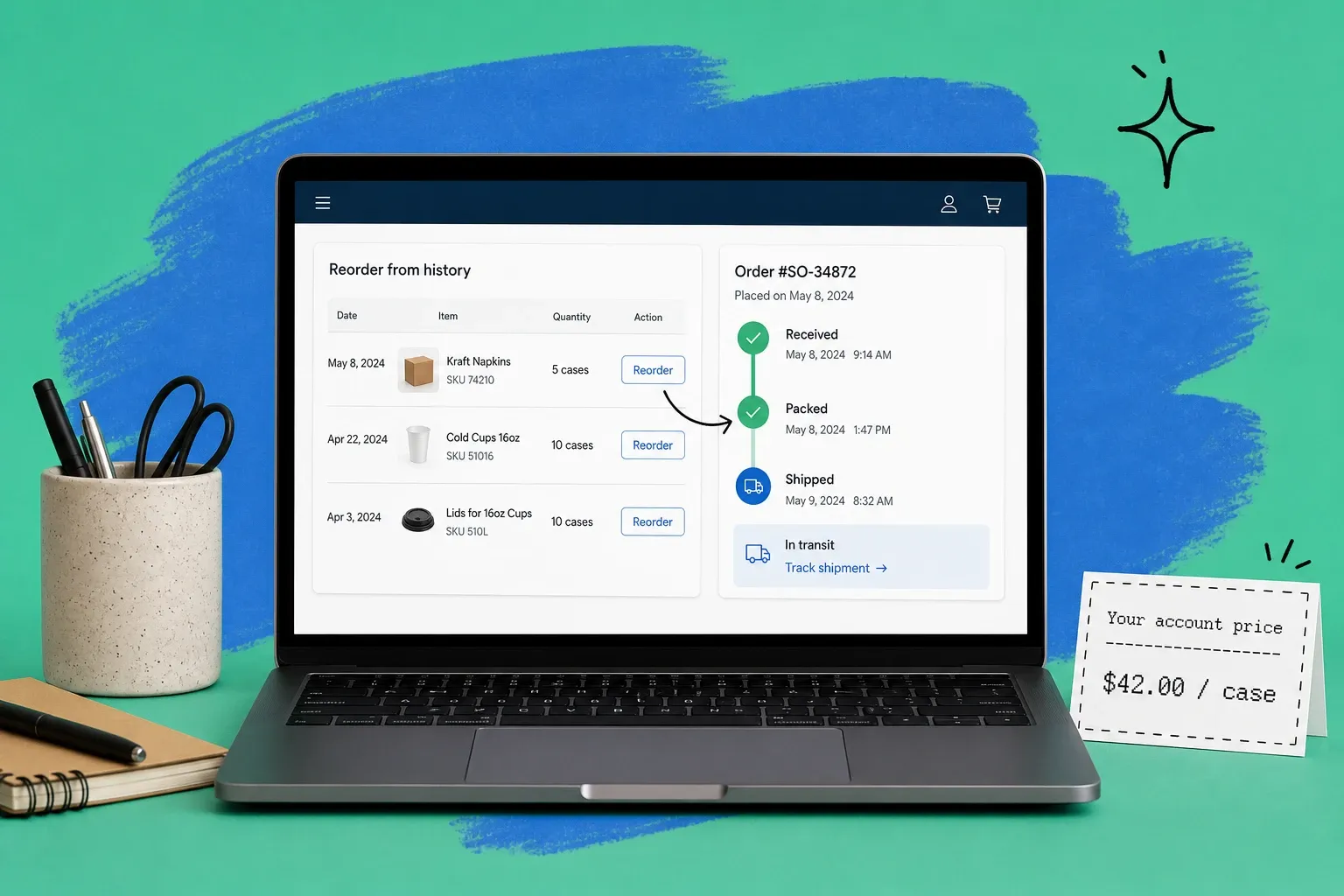
Most B2B purchasing is repeat purchasing. A buyer who ordered 40 cases last month will likely order something similar this month. A good portal lets them open a past order and re-buy it in two clicks, or build a recurring order list they top up on a schedule. This single feature drives more portal usage than anything else, because it maps to how buyers actually behave.
Real-time order status and tracking
"Where is my order" is the most common B2B support question, full stop. When the portal shows live status from received to packed to shipped, with a tracking link, that question disappears. The key word is live. If the status lags behind reality, buyers stop trusting it. For a deeper look at turning tracking into a retention tool, see our piece on order tracking software.
Account-specific pricing and terms
B2B pricing is rarely one-size-fits-all. Buyers expect to log in and see their price, not list price. The portal should pull each account's negotiated tier, contract pricing, and volume breaks automatically. Same for payment terms: if a buyer is on Net 30, the portal should let them place an order on terms without a credit card.
Invoices, balances, and payments
Let buyers see open invoices, download past ones, and check their balance without asking accounting. If you can accept payment in the portal, even better. This is the part that quietly saves your finance team hours every week.
User roles and permissions
A business buyer is usually a team, not a person. The purchasing manager places orders, the warehouse lead checks delivery, the finance contact handles invoices. Role-based logins let each person see what they need and nothing they should not. This is also how you keep one departing employee from taking the account login with them.
How a B2B customer portal cuts support load
The business case for a portal is mostly about deflection. Every status check, reorder request, and invoice question your buyers handle themselves is one your team does not have to.
The volume here is real. McKinsey's 2024 B2B Pulse Survey found that B2B buyers now use an average of 10.2 interaction channels during a purchase, up from just five in 2016 (McKinsey, 2024). More channels means more inbound questions if you do not give buyers a single place to self-serve. The same research found that more than half of buyers would switch suppliers if the cross-channel experience was poor, so a clunky process is not just a cost problem, it is a retention risk.
There is money on the table too. Forrester predicted that more than half of large B2B transactions over $1M would be processed through digital self-serve channels by 2025 (Forrester, 2024). Buyers are willing to place big orders without a rep in the loop, as long as the self-service experience is good enough to trust. A portal is how you earn that trust at scale.
B2B customer portal examples and use cases
A few common patterns show how this plays out:
- Wholesale and distribution. A brand sells to hundreds of retail accounts. Each logs in to reorder SKUs they already stock, on their own pricing, on terms. The portal replaces a stack of emailed purchase orders and spreadsheets.
- Manufacturers selling to dealers. Dealers check parts availability, place orders, and track shipments to job sites without phoning the branch.
- Brands with both DTC and B2B. The consumer storefront stays public, while approved trade accounts get a separate login with wholesale pricing and bulk ordering.
In every case the portal is doing the same core job: turning a relationship that used to run on email and phone calls into self-service, without losing the account-specific pricing and terms that make B2B work.
How to set up a B2B customer portal connected to your order management
The most common mistake is treating the portal as a standalone website. A portal is a window. What buyers see through it is your operational data: stock levels, prices, order status, invoices. If that data lives in five disconnected systems, the portal will show stale or wrong information, and buyers will abandon it fast.
The fix is to connect the portal to a single source of truth for orders and inventory. That is the job of an order management system, which sits between your sales channels and your fulfillment and keeps one accurate picture of every order and every unit of stock. If you are new to the concept, start with our explainer on what an order management system is.
Once orders and inventory flow through one system, the portal becomes straightforward:
- Pick the buyers and use cases the portal needs to serve first. Reordering and order status cover the majority of demand, so start there.
- Connect the portal to your order and inventory data so prices, stock, and status are always live, not manually updated.
- Set up account-level pricing, terms, and roles so each buyer sees their own reality.
- Roll it out to a few accounts, gather feedback, then expand.
This is where a platform that handles both B2B ordering and order management in one place pays off. OmniOrders gives buyers real-time order tracking and self-service B2B ordering on top of the same system that runs your fulfillment, so the portal and your operations never drift out of sync. That is the whole point of self-service: it only works when the data behind it is trustworthy.
Getting started
You do not need to build a portal from scratch to give buyers self-service. Start by mapping the questions your team answers most often. If "where is my order" and "can I reorder this" top the list, a B2B customer portal connected to your order management will pay for itself in deflected support alone, and your buyers will thank you for it.
The buyers have already moved to digital and self-directed buying. Meeting them there is no longer the advanced move. It is the baseline.
Frequently asked questions
What is the difference between a B2B portal and a B2B customer portal?
A B2B portal is any online gateway between two businesses, including supplier marketplaces and partner sites. A B2B customer portal is more specific. It is the logged-in area where your existing buyers reorder, see order status, and manage their account with you. Think of it as your accounts logging in to self-serve, not a public storefront.
How much does a B2B customer portal cost?
Costs range widely. A custom-built portal can run from tens of thousands of dollars upward once you add development, hosting, and ongoing maintenance. Many sellers avoid that by using a portal that ships with their order management or B2B commerce platform, which folds the feature into a monthly subscription. The cheaper path is usually buying a portal that connects to your existing systems rather than building one from scratch.
What makes a good B2B customer portal?
A good portal shows accurate, real-time data and removes steps. The essentials are reorder from order history, live order status and tracking, account-specific pricing, visible invoices and payment terms, and user roles so a buyer's whole team can log in. If any of that data is stale, buyers stop trusting the portal and go back to email.
Do I need an order management system to run a B2B customer portal?
You do not strictly need one, but the portal is only as good as the data behind it. An order management system gives the portal a single accurate source for stock, pricing, and order status across every channel. Without that, you end up maintaining the portal by hand, which defeats the purpose of self-service.
How does a B2B customer portal reduce support tickets?
Most B2B support tickets are repeat questions: where is my order, can I reorder last month's pallet, what is my balance. A portal answers all three on demand, so buyers self-serve instead of emailing or calling. That frees your team to handle exceptions and new accounts rather than status lookups.
Start your 14-day free trial
See how OmniOrders connects your sales channels, 3PLs, and carriers into one operational layer — free for 14 days, no credit card.