Bundle SKUs and Kit SKUs Explained: Managing Assemblies Without Inventory Chaos
A bundle SKU is one sellable product made up of several component SKUs that ship together, like a gift set, a starter kit, or a "buy the whole routine" pack. When a customer buys the bundle, your system should reduce the stock of every component inside it, and the number of bundles you can sell should be capped by whichever component you have the least of.
A bundle SKU is a parent product code that maps to multiple child component SKUs in fixed quantities, and its availability is derived from component stock rather than a stock number of its own.
That sounds simple. It stops being simple the moment the same components sell on their own, sell inside more than one bundle, or sell across Shopify, Amazon, and Walmart at the same time. Get the relationship wrong and you oversell, disappoint customers, and spend your evenings reconciling spreadsheets. Get it right and bundling becomes one of the most profitable things you do. McKinsey research has found that effective product bundling can lift sales by around 20%, with meaningful gains in profit on top.
This guide explains how bundle and kit SKUs actually work, how inventory should decrement, why single-channel tools struggle, and how to keep availability accurate when you sell everywhere at once.
What is a bundle SKU, exactly?
A bundle SKU groups existing products under one new code so customers can buy them in a single click. The bundle is what the shopper sees and pays for. The components are what actually leave your shelves.
The key idea is that the bundle does not own inventory. Its components do. If you try to track a bundle as its own pile of stock, you immediately create two competing sources of truth: the bundle count and the component counts. They drift apart within days, and that drift is where overselling lives.
Think of a bundle recipe like this:
- Parent SKU: `GIFT-SET-01` (what the customer buys)
- Child SKU A: `CANDLE-LAV` x 1
- Child SKU B: `SOAP-OAT` x 1
- Child SKU C: `BALM-MINT` x 2
One sale of `GIFT-SET-01` should remove one candle, one soap, and two balms from inventory. The bundle's "stock" is never set by hand. It is calculated.
Bundle SKU vs kit SKU vs virtual SKU: what is the difference?
These terms get used interchangeably, which causes half the confusion. Here is a practical breakdown.
Term | What it means | Holds its own stock? | Typical use |
|---|---|---|---|
Bundle SKU | Components sold together for merchandising or pricing | No, derived from components | Gift sets, value packs, "buy the routine" |
Kit SKU | Components physically assembled or co-packed before shipping | Sometimes, after assembly | Subscription boxes, tool kits, hampers |
Virtual SKU | A code with no physical item, used to trigger logic | No | Bundles, digital add-ons, warranties |
Assembly SKU | A finished good built from raw components | Yes, once built | Manufactured or made-to-order products |
The line that matters most is whether assembly happens. A bundle that ships as separate items picked into one box behaves differently from a kit that has to be built, labeled, and stocked as a finished unit before it can ship. We will come back to that under make-to-stock versus make-to-order.
How does inventory decrement work for a bundle SKU?
When a bundle sells, the correct behavior is to decrement each component by the quantity in the recipe. The bundle never carries an independent number you adjust by hand.
That leads to the single most useful formula in bundle management, the bottleneck component rule:
Available bundles = the lowest value of (component on-hand quantity divided by the quantity that component requires), rounded down.
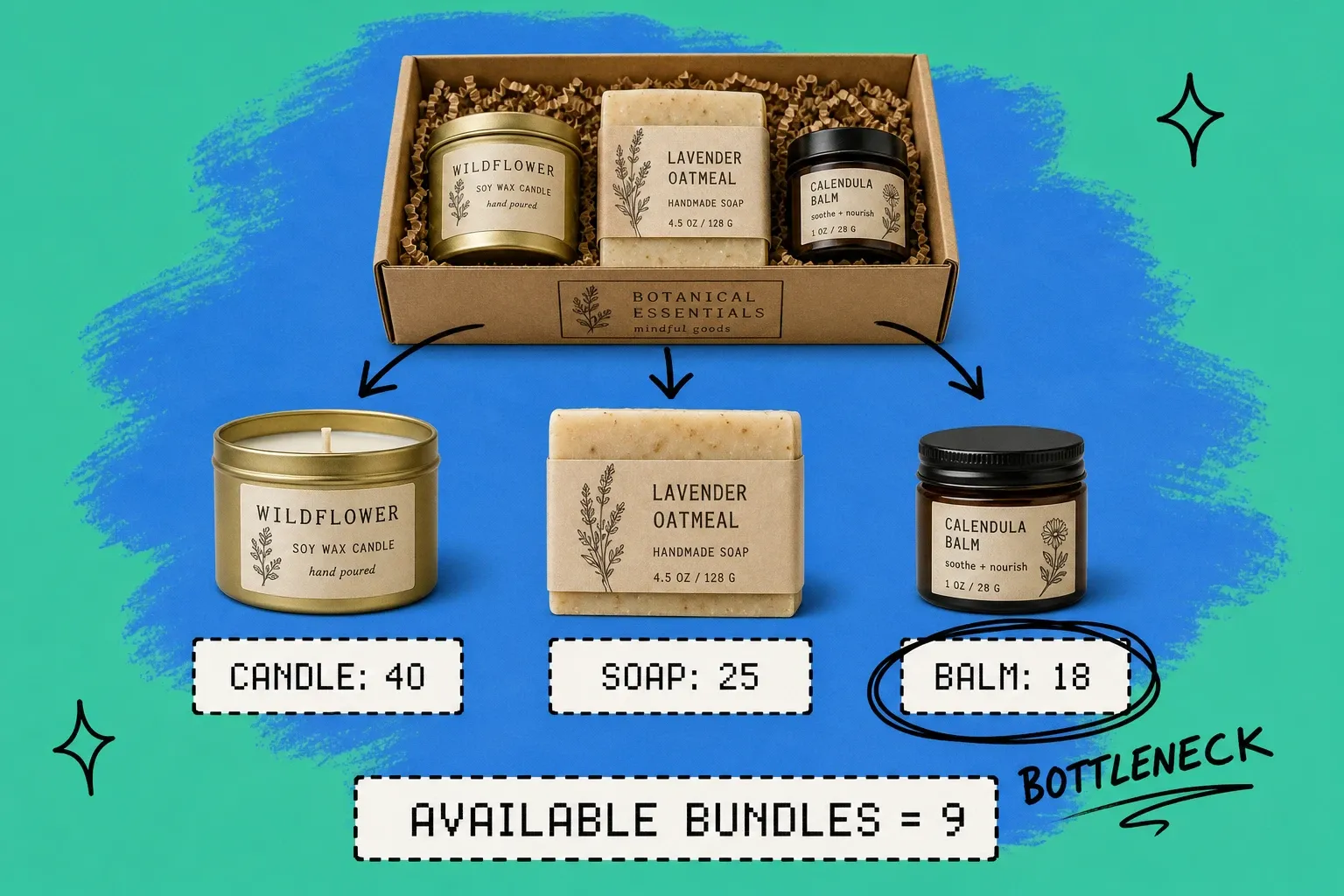
Say `GIFT-SET-01` needs 1 candle, 1 soap, and 2 balms, and you currently hold:
- Candles: 40
- Soaps: 25
- Balms: 18
Run the math per component: candles allow 40 bundles, soaps allow 25 bundles, balms allow 9 bundles (18 divided by 2). The balm is the bottleneck, so you can sell 9 bundles, not 40. The moment a balm sells on its own, that number drops again.
This is also why shared components are tricky. If those same balms appear in a second bundle and in a standalone listing, every channel that can sell a balm changes the availability of every bundle that contains it. Without one source of truth for component stock, those numbers cannot stay honest. This is the same discipline that underpins good multichannel inventory management for Shopify and Amazon sellers: one pool of truth, many places to sell from.
How do parent-child SKU relationships work in practice?
A parent-child relationship is just a mapping: one parent SKU points to one or more child SKUs, each with a required quantity. Done well, it gives you a few things for free:
- One place to change a recipe. Swap the mint balm for a vanilla one in the recipe, and every order and availability calculation updates from one edit.
- Accurate availability everywhere. Because the parent reads from child stock, you never publish a bundle quantity that the components cannot support.
- Clean reporting. You can see true demand for a component across its standalone sales and every bundle it belongs to.
Naming matters here too. Component SKUs should follow a consistent, human-readable convention so a picker can tell `BALM-MINT-30ML` from `BALM-MINT-10ML` at a glance. If your codes are inconsistent, fix that foundation first. Our guides on how to create SKU codes and the complete guide to SKU management for ecommerce cover the conventions that keep bundles from collapsing under their own complexity. And if you are still untangling identifiers, UPC vs SKU vs barcode clears up which code does what.
Why can't Shopify handle bundle SKUs on its own?
Native Shopify treats a bundle as a product with its own inventory number. That design choice creates three predictable failure modes once you sell at any real volume.
Failure mode 1: components and bundles do not talk
Selling the bundle does not reduce the components, and selling a component does not reduce the bundle's availability. You end up maintaining two truths by hand. The average inventory accuracy rate already sits at just 83%, according to CAPS Research data cited by NetSuite, which means almost one in five stock records is wrong before you add bundles. Bundles widen that gap fast.
Failure mode 2: overselling shared stock
When the same item lives in a standalone listing and inside one or more bundles, nothing stops two channels from selling the last unit twice. A Fluent Commerce survey found that 58% of retailers run below 80% inventory accuracy, and shared bundle components are a classic reason why. The customer pays, then gets a cancellation email, which is the fastest way to lose a repeat buyer.
Failure mode 3: multi-warehouse and multi-channel routing
If your components live in more than one warehouse, a bundle can only ship complete from a location that holds every component. Single-channel tools rarely check that, so they accept orders they cannot fulfill from one place, forcing split shipments or manual intervention. Inventory distortion, the combined cost of stockouts and overstocks, already drains an estimated 1.77 trillion dollars from retailers worldwide each year, according to IHL Group. Bundles sold without location-aware logic feed straight into that number.
None of this means Shopify is the problem. It means a bundle is an inventory and order-orchestration concept, and it needs a layer built for that job.
Should you use make-to-stock or make-to-order kitting?
This is the decision that determines how your warehouse actually handles a bundle.
Make-to-order (pick and pack on demand). Components stay as individual stock. When a bundle sells, a picker pulls the components and packs them together at fulfillment time. Best when components also sell on their own, demand is unpredictable, or you run many bundle variants from a shared component pool. It keeps stock flexible and avoids stranded inventory.
Make-to-stock (pre-assembled). You build a quantity of the kit in advance, label it, and hold it as a finished unit. Best when assembly is slow or specialized, when a bundle sells in high and steady volume, or when the packaging itself is the product, like a sealed gift box. The tradeoff is that any component locked into a pre-built kit cannot be sold individually until you break the kit back down.
A useful rule of thumb: if a component sells well on its own, lean make-to-order so you never strand it inside a box. If the bundle is a distinct, high-velocity product with its own packaging, make-to-stock can save real labor at peak.
How an OMS keeps bundle inventory accurate across channels
Once bundles, shared components, multiple warehouses, and multiple sales channels enter the picture, the core need is a single source of truth that every channel reads from and writes to in real time. That is the job of an order management system.
A capable OMS handles bundles by storing the parent-child recipe once, calculating available bundles from live component stock using the bottleneck rule, and decrementing components automatically when any channel sells. Because the component pool is shared, a balm sold on Amazon instantly lowers the available count of every bundle that uses that balm on Shopify and Walmart. Routing logic can also confirm that a single location holds every component before accepting a bundle order, which prevents the split-shipment failure mode.
This is where OmniOrders fits in. It treats the component as the unit of truth, supports kitting recipes for both make-to-order and make-to-stock workflows, and syncs availability across your channels so the number a shopper sees is a number you can actually fulfill. If you want the broader context first, our explainer on what an order management system is walks through where an OMS sits between your storefronts and your warehouse.
Bundle SKU best practices checklist
Use this as a pre-launch checklist before you publish a single bundle.
- Make the component the source of truth. The bundle should never hold its own editable stock number.
- Define a clear recipe. Every parent maps to specific child SKUs with exact quantities.
- Calculate availability with the bottleneck rule. Never publish more bundles than the scarcest component supports.
- Share one stock pool per component. Standalone listings and every bundle must draw from the same pool.
- Decide make-to-stock vs make-to-order per bundle. Match the workflow to demand and assembly effort.
- Confirm location completeness. Only accept a bundle order from a warehouse that holds every component.
- Plan returns at the component level. When a bundle comes back, restock each component, not a bundle count.
- Use consistent SKU naming. Pickers and systems both depend on it.
- Reconcile after promotions. High-velocity bundle events expose any drift quickly, so audit soon after.
Bundles are one of the highest-leverage merchandising moves in ecommerce, but only when the inventory math underneath them is correct. Nail the parent-child relationship, respect the bottleneck component, and give every channel one shared source of truth, and you can sell assemblies at scale without the chaos.
Frequently asked questions
What is a bundle SKU?
A bundle SKU is a single sellable product code that represents two or more component SKUs sold together as one unit, such as a gift set or a starter kit. The bundle itself usually holds no independent stock. Its availability is calculated from the on-hand quantity of its components.
What is the difference between a bundle SKU and a kit SKU?
The terms overlap, but a bundle SKU usually means components sold together for merchandising or pricing reasons, while a kit SKU often implies physical assembly or packaging before shipment. Both rely on a parent-child relationship where one parent SKU maps to multiple child component SKUs with set quantities.
How does inventory decrement when a bundle SKU sells?
When a bundle sells, the system should reduce the on-hand quantity of each component by the amount defined in the bundle recipe, not decrement a separate bundle stock number. If a bundle contains two of component A and one of component B, one sale removes two units of A and one unit of B from inventory.
How do you calculate available bundle quantity?
Available bundles equal the lowest result of dividing each component's on-hand quantity by the number of that component the bundle requires, rounded down. If a bundle needs 2 units of A and you have 10 of A and 3 of B, you can build 3 bundles, because B is the bottleneck component.
Why can't Shopify manage bundle SKU inventory on its own?
Native Shopify treats a bundle as its own product with its own stock number, so selling a bundle does not automatically reduce the components, and selling a component does not reduce bundle availability. That gap causes overselling, manual reconciliation, and broken availability counts, especially once you sell the same components on Amazon or Walmart.
Can you sell the same product both on its own and inside a bundle?
Yes, and that is exactly where shared component logic matters. The component SKU should have one source of truth for stock, and both the standalone listing and every bundle that contains it should draw from that same pool so a sale in one place updates availability everywhere.
Start your 14-day free trial
See how OmniOrders connects your sales channels, 3PLs, and carriers into one operational layer — free for 14 days, no credit card.