How to Create SKUs for Shopify, Amazon & WooCommerce (Without the Reconciliation Nightmare)
The direct answer: multi-channel sellers should not use one SKU format across Shopify, Amazon, and WooCommerce. Each platform enforces different rules, so the right approach is to assign each channel the SKU format it prefers and link them as aliases inside your OMS.
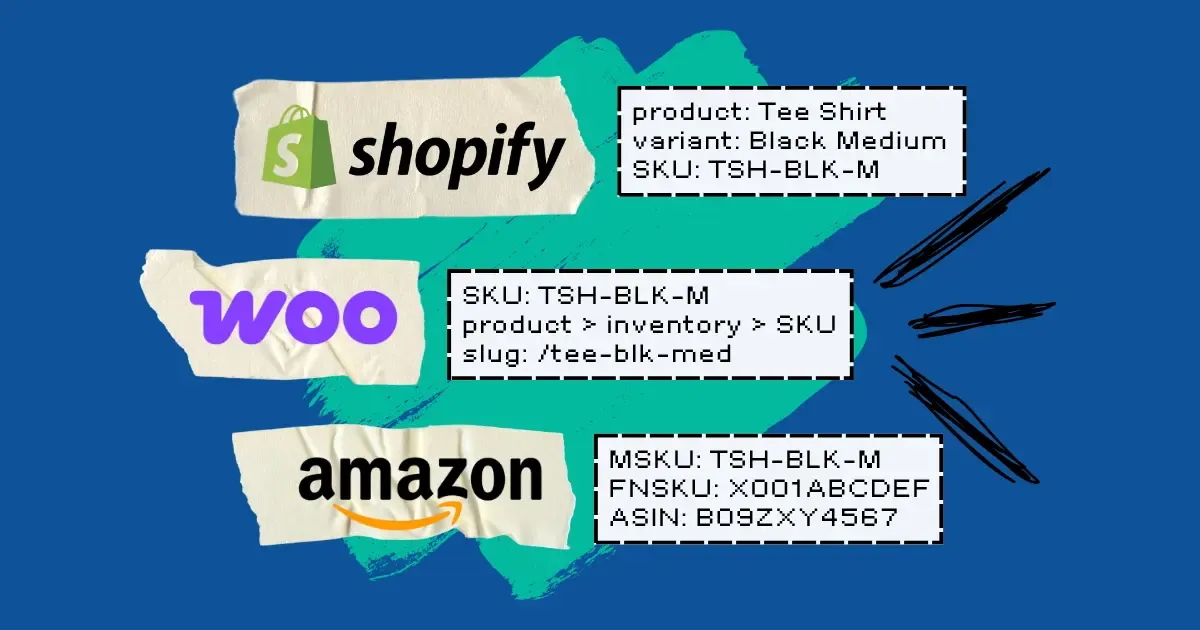
You sell the same black t-shirt on Shopify, Amazon, and WooCommerce. On Shopify it's TSH-BLK-M. On Amazon it's TSHBLKM-2024 because your original SKU had a slash Amazon rejected. On WooCommerce it's tshirt_black_medium because whoever imported your CSV two years ago used underscores. Q3 rolls around, you pull a sell-through report, and the same shirt shows up as three different products.
Every SKU guide on the internet tells you the same thing: design one clean SKU format and use it everywhere. That advice is wrong for multi-channel sellers. Shopify, Amazon, and WooCommerce each have different rules, different field behavior, and different tolerance for special characters. Forcing one string through all three is how you end up with the mess above.
This article walks you through how to create SKUs inside each platform, what each platform allows, and the alias-based approach that fixes the cross-channel mess for good. If you want the broader strategic framing first, start with our complete guide to SKU management.
Why "one SKU everywhere" fails for multi-channel sellers
A single SKU format cannot satisfy Shopify, Amazon, and WooCommerce simultaneously because each platform enforces different character rules, length limits, and case-sensitivity behavior. Forcing one string through all three platforms creates reconciliation errors that compound over time.
Every multi-channel ops manager recognizes this scenario. You launched on Shopify, designed a clean SKU format like CAT-COLOR-SIZE, and it worked. Then you added Amazon Seller Central. Some of your SKUs had forward slashes, which Amazon rejected, so you manually edited those listings. Then you added WooCommerce through a migration tool that auto-lowercased everything.
Three years later, the same product lives in three systems under three different strings. Pull a unified sell-through report and nothing matches. Inventory on Shopify drops, and your Amazon FBA (Fulfillment by Amazon) listing has no idea. Returns come back to your 3PL and the warehouse team can't tell which channel's SKU to scan.
Generic SKU advice doesn't account for any of this because almost every guide assumes you're selling on one platform. The 8-step format frameworks in our how to create SKU codes post are the foundation, and you should read that one for the underlying structure. But foundation isn't enough when three platforms each enforce different rules on the same string.
The fix isn't a cleverer format. The fix is to stop pretending one SKU has to live in all three systems. Each channel gets the SKU format it prefers, and your OMS treats those strings as aliases pointing at one canonical product.
Creating a Shopify SKU that survives variants
Shopify stores SKUs at the variant level only and has no parent-product SKU. The Shopify SKU field accepts up to 255 characters, allows almost any character including slashes and spaces, and performs no uniqueness check by default.
In Shopify, the SKU field lives inside the variant editor. Go to Products, open any product, and scroll to the Inventory section. You'll see a SKU (Stock Keeping Unit) field for each variant. If your product has no variants, Shopify still treats the single configuration as a variant under the hood, and the SKU attaches there.
Because SKUs live at the variant level, a t-shirt product with three sizes and two colors has six SKUs in Shopify, not one. If you're coming from a system that tracks a master SKU per product, you'll need to adjust your mental model.
Shopify's SKU field is also permissive in three specific ways. It accepts up to 255 characters. It allows almost any character, including slashes, spaces, and Unicode. And it performs no uniqueness check by default — you can save two variants with the same SKU and Shopify will shrug.
That permissiveness is dangerous for multi-channel sellers. Shopify will happily accept a SKU like BOTTLE/BLK/32OZ that Amazon will reject the instant you try to sync it. If you only sell on Shopify, this flexibility is fine. If Shopify is one of three channels, you need to self-impose the stricter rules Amazon enforces — or accept that you'll maintain two different SKUs per variant.
A concrete Shopify-friendly SKU format: TSH-BLK-M for a black medium t-shirt, or BOTTLE-BLK-32OZ for a 32-ounce black water bottle. Uppercase, hyphens as separators, no spaces, no slashes. Fits the Shopify field cleanly and survives the trip to Amazon.
Creating an Amazon SKU (MSKU vs FNSKU vs ASIN)
Amazon uses three different identifiers that all get called "SKU" in casual conversation: MSKU, FNSKU, and ASIN. Only the MSKU is one you design yourself.
Before you create a single Amazon listing, you need to understand these three identifiers. They're not the same thing.
Identifier | What it is | Who controls it |
|---|---|---|
MSKU (Merchant SKU) | The SKU you choose in Seller Central | You |
FNSKU (Fulfillment Network SKU) | Amazon's barcode for FBA inventory units | Amazon (generated when you send inventory to FBA) |
ASIN (Amazon Standard Identification Number) | Amazon's internal product ID | Amazon (assigned when the listing is created) |
The MSKU is the only one you design. The FNSKU is generated when you create an FBA shipment and ends up printed on the label that sticks to each unit in Amazon's warehouses. The ASIN is assigned by Amazon when the listing is created and you don't get to pick it. The rest of this section is about MSKUs — the only identifier under your control.
Amazon SKU format rules
The Amazon SKU format has a 40-character limit on the MSKU field. The MSKU field is case-sensitive. The MSKU field blocks forward slashes, asterisks, question marks, angle brackets, pipes, and quotes.
The Amazon MSKU field lives on the Offer tab of the Seller Central listing form. Create a new listing, go to Offer, and you'll see "Seller SKU" near the top. The full rules:
- 40-character maximum
- Case-sensitive (TSH-BLK-M and tsh-blk-m are different SKUs as far as Amazon is concerned)
- No forward slashes, asterisks, question marks, angle brackets, pipes, or quotes
- No leading or trailing spaces
- Must be unique within your seller account
The character restrictions catch people off guard. A SKU format like TSH/BLK/M that works fine on Shopify gets rejected with a generic validation error the first time you try to save the Amazon listing. Same with SKU formats that use asterisks as separators or include quote marks for inch measurements.
A compliant Amazon MSKU for that same t-shirt: TSH-BLK-M. A compliant water bottle MSKU: BOTTLE-BLK-32OZ. Stick with uppercase letters, digits, and hyphens and you'll never hit the character rules.
If you're migrating existing Shopify SKUs into Amazon and some contain prohibited characters, you have two options: rewrite them on the Shopify side (annoying, breaks historical reports) or create a different MSKU on the Amazon channel that follows Amazon's rules (cleaner, but requires an OMS that can handle the mismatch).
Creating a WooCommerce SKU (and its validation gaps)
WooCommerce has almost no SKU validation. The WooCommerce SKU field accepts any string, does not enforce uniqueness by default, has no length limit, and has no character restrictions.
In WooCommerce, the SKU field lives on the Product data panel of the product editor, under the Inventory tab. For simple WooCommerce products, the field is right there. For variable WooCommerce products, each variation gets its own SKU field under the Variations tab.
You can paste a full paragraph of text into the WooCommerce SKU field and WooCommerce will save it. A setting buried in WooCommerce preferences can warn you about duplicates, but it's off by default.
This is a trap for multi-channel sellers. WooCommerce will let you save SKUs that Amazon will later reject, and it will let you save duplicates that make inventory sync ambiguous. If WooCommerce is one of your channels, treat its permissiveness as a liability and self-enforce the Amazon-safe rules: 40 characters or fewer, uppercase alphanumeric plus hyphens, no special characters.
A WooCommerce SKU that works everywhere: MUG-CER-12OZ for a 12-ounce ceramic mug. A WooCommerce SKU that will bite you later: mug ceramic 12oz (spaces), mug/cer/12oz (slashes), or Mug-Cer-12oz (mixed case, which Amazon treats as a different SKU than MUG-CER-12OZ).
The fix: alias your SKUs across Shopify, Amazon, and WooCommerce
The alias approach assigns each channel the SKU format it prefers and links those strings to one canonical product inside your OMS. Instead of burning hours trying to design one SKU that satisfies Shopify's permissiveness, Amazon's strictness, and WooCommerce's anything-goes field, you use the format each platform prefers and let your OMS handle the mapping.
In OmniOrders, every product has one canonical record and multiple channel-specific SKU aliases hanging off it. Your Shopify variant SKU, your Amazon MSKU, and your WooCommerce SKU all point at the same underlying product. They don't have to match. When an order comes in from Amazon under one SKU and an order comes in from Shopify under a different one, both decrement the same inventory pool.
The Amazon specifics: OmniOrders uses the MSKU to do the heavy lifting for stock updates and order pulls, because the MSKU is the identifier you control. OmniOrders stores the FNSKU as an alias type, so inbound FBA units can still be matched back to the canonical product. OmniOrders intentionally does not store the ASIN, because the ASIN is Amazon's identifier, not yours, and Amazon generates it independently of anything you do.
This is also the escape hatch for the Amazon-rejects-my-Shopify-SKU problem. OmniOrders does not auto-strip prohibited characters or rewrite your Shopify strings. Because per-channel SKUs don't need to match, you set a different MSKU on the Amazon channel that complies with Amazon's rules. The Shopify SKU stays as-is. The canonical product connects them.
If you're starting from scratch and want a format that survives all three platforms out of the gate, the free SKU generator produces Amazon-safe strings you can use as your baseline everywhere.
Common mistakes to avoid
- Designing one SKU format without checking Amazon's prohibited character list first.
- Using slashes, asterisks, or quotes as separators (Amazon rejects all of them).
- Assuming Shopify's lack of uniqueness enforcement means duplicates are safe.
- Treating the FNSKU as interchangeable with the MSKU when setting up FBA inventory.
- Migrating legacy SKUs between platforms without auditing for case-sensitivity changes.
- Storing ASINs in your internal SKU field instead of treating them as Amazon's separate identifier.
Frequently Asked Questions
How do Shopify, Amazon, and WooCommerce SKUs differ? Shopify allows up to 255 characters with no character restrictions and no uniqueness enforcement. Amazon enforces a 40-character limit, blocks special characters like slashes and asterisks, and is case-sensitive. WooCommerce has almost no validation, which means you can save SKUs there that Amazon will later reject.
What is the difference between MSKU, FNSKU, and ASIN? MSKU is the Merchant SKU you choose in Amazon Seller Central. FNSKU is the Fulfillment Network SKU Amazon generates as a barcode for FBA inventory units. ASIN is Amazon's product catalog identifier, assigned automatically when a listing is created. You only control the MSKU.
Can the same product have different SKUs on different channels? Different channels can hold different SKU strings for the same product, and for multi-channel sellers that's usually the right approach. An OMS that supports per-channel SKU aliases links different strings to one canonical product, so inventory and orders still sync correctly when the SKUs don't match.
Why does Amazon reject some of my SKU codes? Amazon's MSKU field blocks specific characters including forward slashes, asterisks, question marks, angle brackets, and pipes. It also enforces a 40-character limit and treats SKUs as case-sensitive. A SKU format that works fine on Shopify or WooCommerce can fail Amazon's validation for any of these reasons.
Book a 20-minute demo
See how OmniOrders links your Shopify, Amazon, and WooCommerce SKUs to one canonical product — so per-channel SKU formats stay compliant, inventory stays in sync, and your reports finally reconcile. Pre-built connectors, per-channel SKU aliases, real-time inventory sync, FNSKU support for FBA.